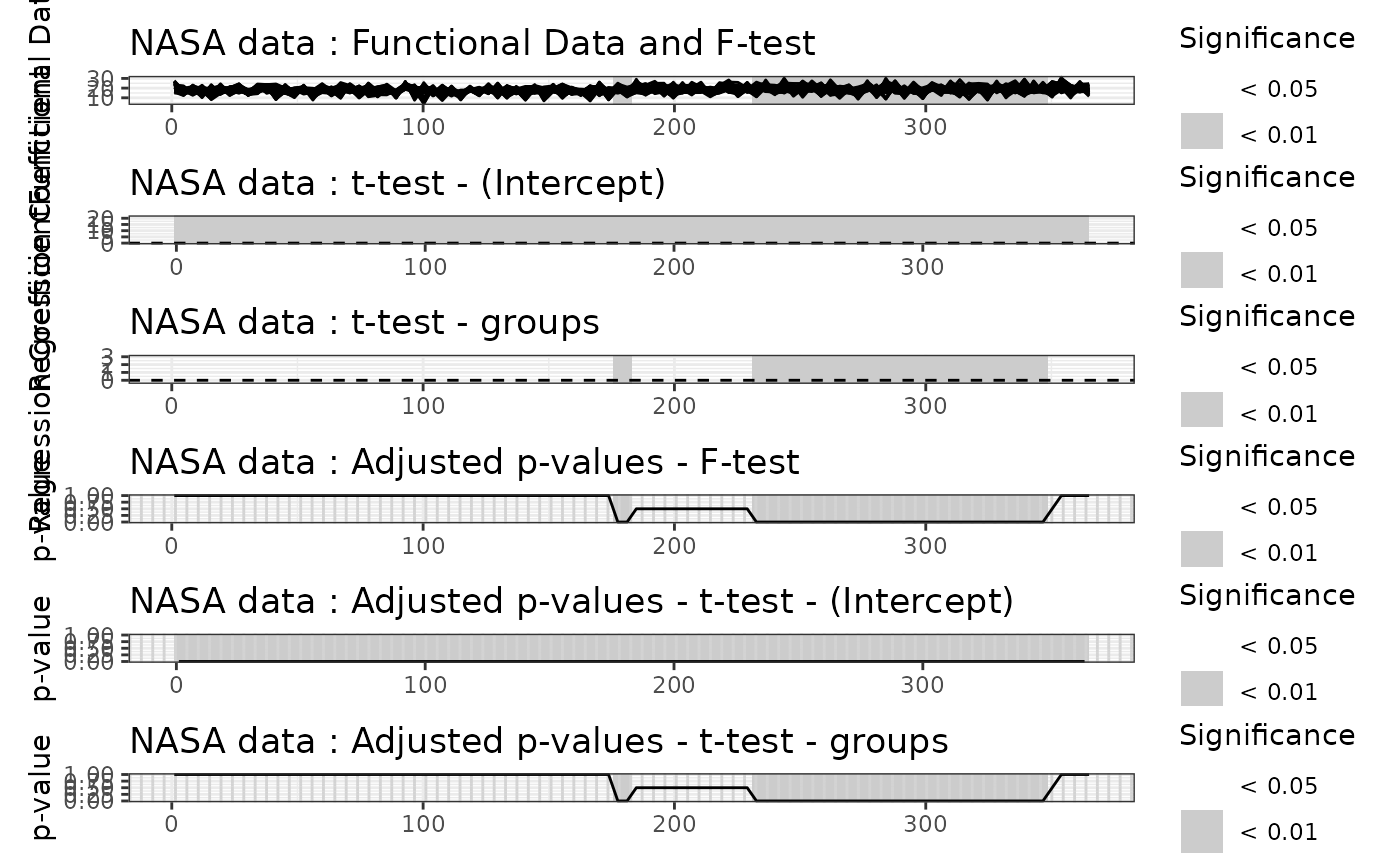
The S3 methods autoplot.flm() and plot.flm() are methods
for plotting results of functional-on-scalar linear model tests. They
visualize the functional regression coefficients and the adjusted p-values
obtained from the testing procedures. The plots highlight significant
effects at two levels of significance, alpha1 and alpha2, using shaded
areas.
Usage
# S3 method for class 'flm'
autoplot(
  object,
  xrange = c(0, 1),
  alpha1 = 0.05,
  alpha2 = 0.01,
  plot_adjpval = FALSE,
  col = c(1, grDevices::rainbow(dim(object$adjusted_pval_part)[1])),
  ylim = NULL,
  ylabel = "Functional Data",
  title = NULL,
  linewidth = 1,
  type = "l",
  ...
)

# S3 method for class 'flm'
plot(
  x,
  xrange = c(0, 1),
  alpha1 = 0.05,
  alpha2 = 0.01,
  plot_adjpval = FALSE,
  ylim = NULL,
  col = 1,
  ylab = "Functional Data",
  main = NULL,
  lwd = 0.5,
  type = "l",
  ...
)
Arguments
- object, x
An object of class
flm, usually a result of a call tofunctional_lm_test(),iwt_lm(),twt_lm()orglobal_lm().- xrange
A length-2 numeric vector specifying the range of the x-axis for the plots. Defaults to
c(0, 1). This should match the domain of the functional data.- alpha1
A numeric value specifying the first level of significance used to select and display significant effects. Defaults to
alpha1 = 0.05.- alpha2
A numeric value specifying the second level of significance used to select and display significant effects. Defaults to
alpha2 = 0.01.- plot_adjpval
A boolean value specifying whether the plots of adjusted p-values should be displayed. Defaults to
FALSE.- col
An integer specifying the color for the plot of functional data. Defaults to
1L.- ylim
A 2-length numeric vector specifying the range of the y-axis. Defaults to
NULL, which determines automatically the range from functional data.- ylabel, ylab
A string specifying the label of the y-axis of the functional data plot. Defaults to
"Functional Data".- title, main
A string specifying the title of the functional data plot. Defaults to
NULLin which case no title is displayed.- linewidth, lwd
A numeric value specifying the width of the line for the functional data plot. Note that the line width for the adjusted p-value plot will be twice this value. Defaults to
0.5.- type
A string specifying the type of plot for the functional data. Defaults to
"l"for lines.- ...
Other arguments passed to specific methods. Not used in this function.
Value
The autoplot.flm() function creates a ggplot object that
displays the functional data and the adjusted p-values. The significant
intervals at levels alpha1 and alpha2 are highlighted in the plots.
The plot.flm() function is a wrapper around autoplot.flm()
that prints the plot directly.
References
Pini, A., & Vantini, S. (2017). Interval-wise testing for functional data. Journal of Nonparametric Statistics, 29(2), 407-424.
Pini, A., Vantini, S., Colosimo, B. M., & Grasso, M. (2018). Domain‐selective functional analysis of variance for supervised statistical profile monitoring of signal data. Journal of the Royal Statistical Society: Series C (Applied Statistics) 67(1), 55-81.
Abramowicz, K., Hager, C. K., Pini, A., Schelin, L., Sjostedt de Luna, S., & Vantini, S. (2018). Nonparametric inference for functional‐on‐scalar linear models applied to knee kinematic hop data after injury of the anterior cruciate ligament. Scandinavian Journal of Statistics 45(4), 1036-1061.
See also
IWTimage() for the plot of p-values heatmaps (for IWT).
Examples
temperature <- rbind(NASAtemp$milan[, 1:100], NASAtemp$paris[, 1:100])
groups <- c(rep(0, 22), rep(1, 22))

# Performing the IWT
IWT_result <- IWTlm(temperature ~ groups, B = 2L)
#>
#> ── Point-wise tests ────────────────────────────────────────────────────────────
#>
#> ── Interval-wise tests ─────────────────────────────────────────────────────────
#>
#> ── Interval-Wise Testing completed ─────────────────────────────────────────────

# Summary of the IWT results
summary(IWT_result)
#> $call
#> functional_lm_test(formula = formula, correction = "IWT", dx = dx,
#>     B = n_perm, method = method, recycle = recycle)
#>
#> $ttest
#>             Minimum p-value
#> (Intercept)               0 ***
#> groups                    0 ***
#>
#> $R2
#>               Range of functional R-squared
#> Min R-squared                  0.0003189364
#> Max R-squared                  0.2476892354
#>
#> $ftest
#>   Minimum p-value
#> 1               0 ***
#>

# Plot of the IWT results
plot(
  IWT_result,
  main = "NASA data",
  plot_adjpval = TRUE,
  xlab = "Day",
  xrange = c(1, 365)
)